PrivaPDF runs entirely on your machine. No cloud servers. No uploads. No exceptions.
100% Offline
No cloud. No servers. No internet required. PrivaPDF works completely offline — even with Wi-Fi disabled. Perfect for air-gapped law firm networks.
Permanent Redaction
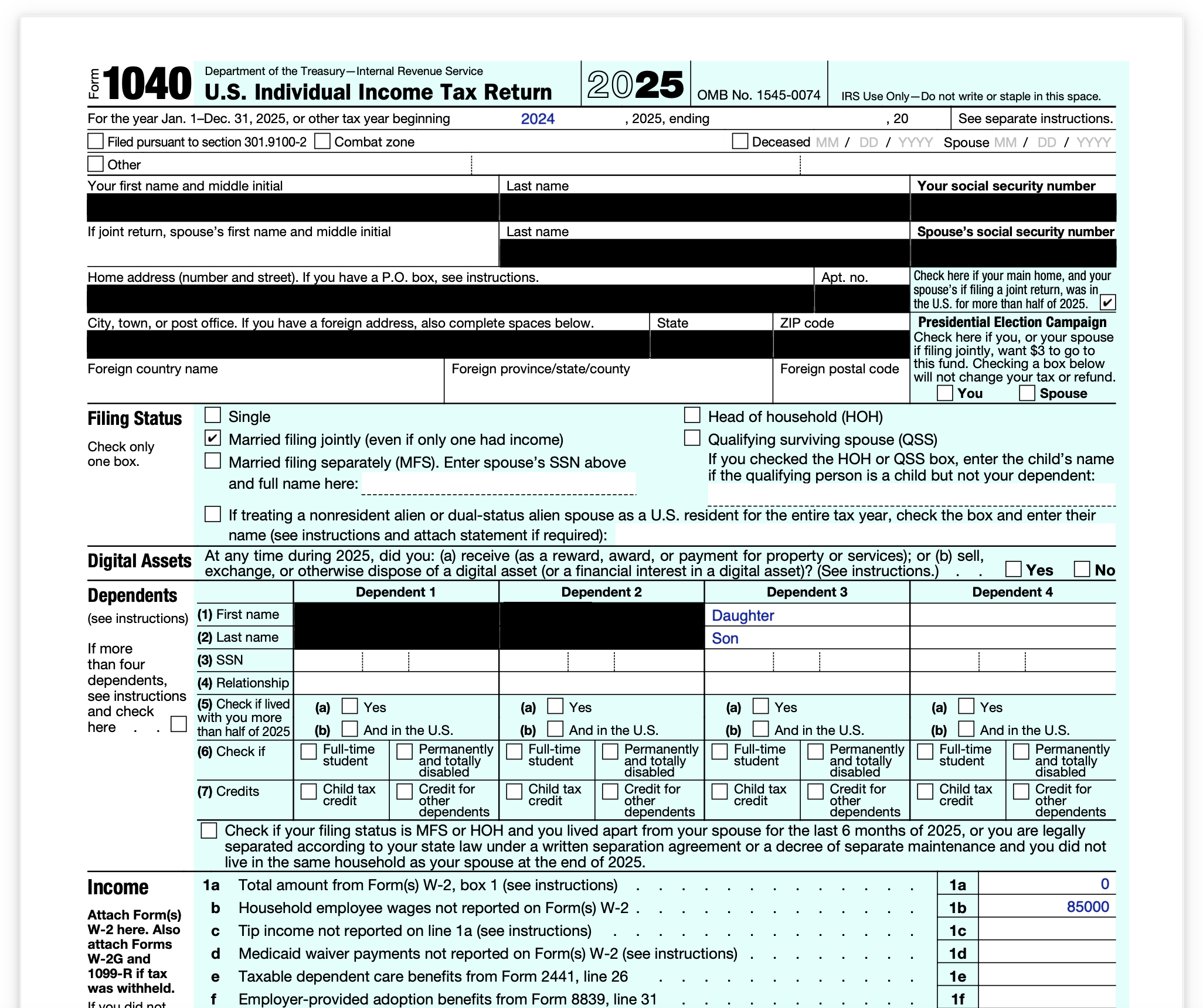
Not visual overlays. Actual content removal using industry-standard PDF redaction that passes forensic inspection. Once redacted, data is permanently unrecoverable.
Your Documents Stay Private
No document content is ever uploaded or transmitted. We may collect anonymous crash reports and basic usage data to improve the app, but no documents, text, or file content ever leaves your computer.
Built for Your Workflow
Everything you need to redact sensitive documents quickly, accurately, and permanently.
Auto-Detect 10 PII Types
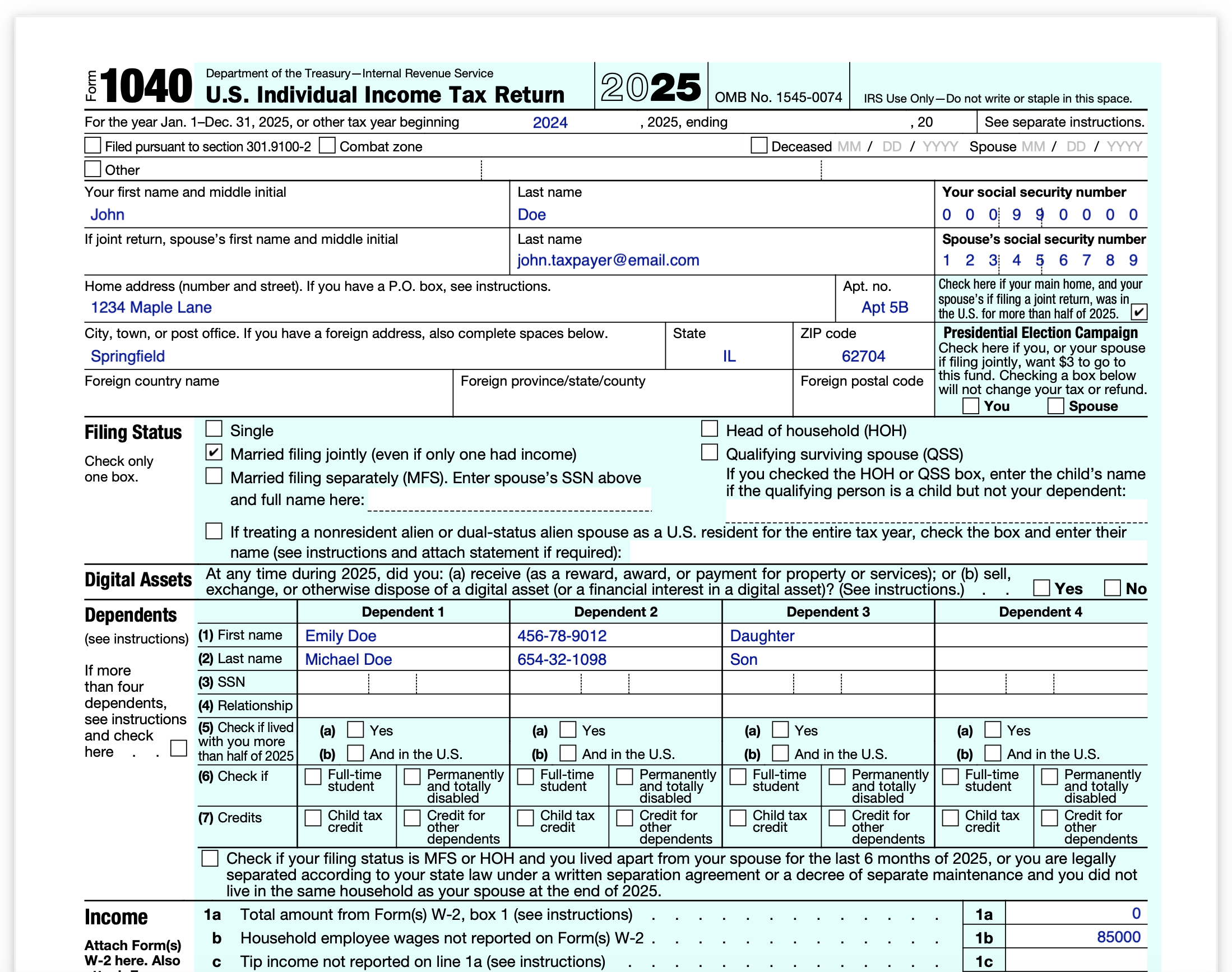
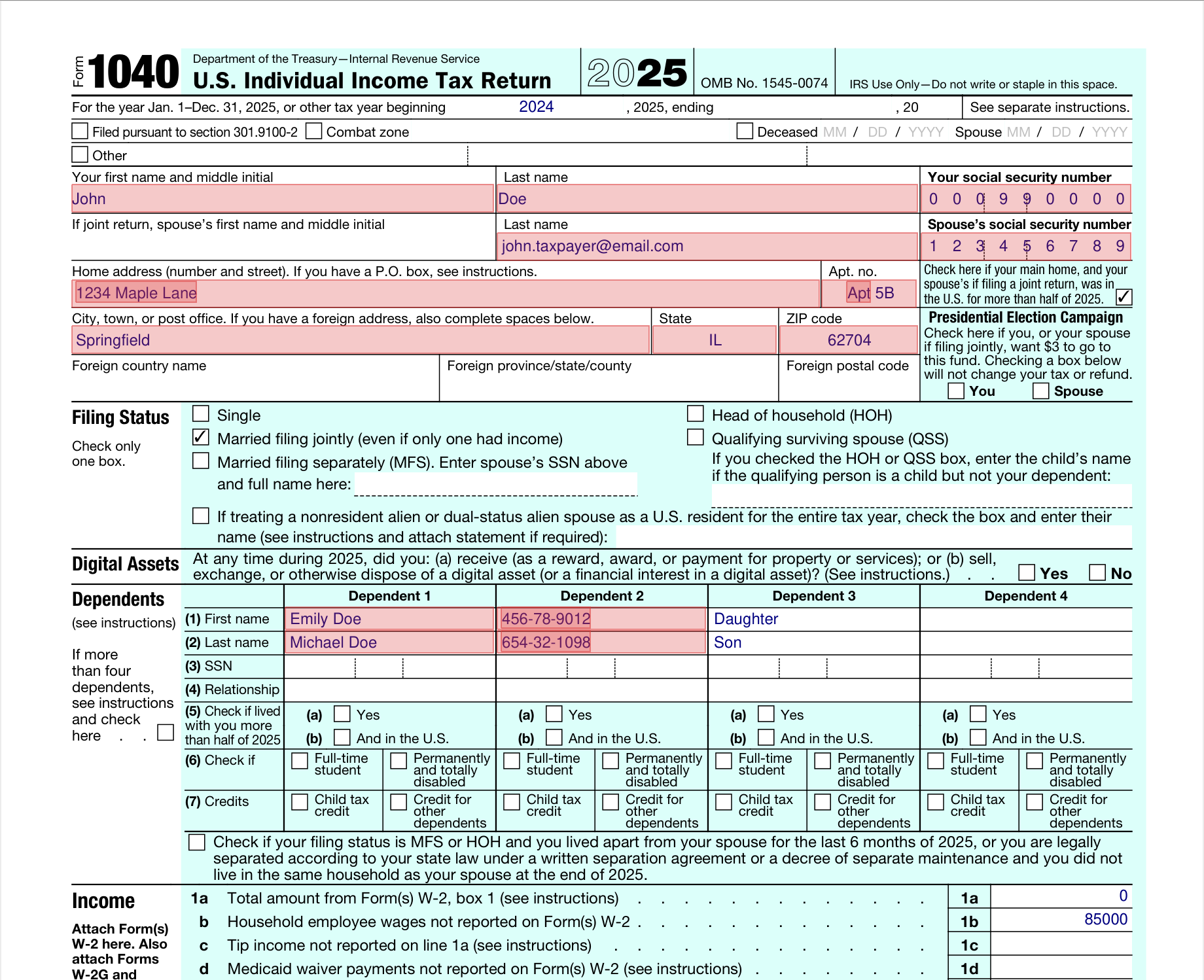
PrivaPDF scans every page and highlights Social Security Numbers, credit cards, phone numbers, emails, dates of birth, routing numbers, passport numbers, EINs, names, and addresses — automatically.
Smart validation reduces false positives: Luhn check on credit cards, IRS prefix validation on EINs, context keywords for routing numbers and passports.
Redact Once, Apply Everywhere
Select any text on any page. PrivaPDF finds every occurrence across all pages in all loaded files and marks them for redaction. No more hunting through 500-page documents page by page.
Batch Processing
Drop an entire folder of PDFs. Set your redaction preferences once. Click "Redact All." PrivaPDF processes every file and saves redacted copies to your chosen output folder.
Save & Load Redaction Profiles
Working with the same client or document type repeatedly? Save your redaction settings — custom text, blocklist, category toggles — as a named profile. Load it next time in one click.
Custom Rectangle Redaction
Draw rectangles over signatures, photos, handwritten notes, or any area you want blacked out. Works on scanned documents too — OCR handles the text, rectangles handle the rest.
OCR for Scanned Documents
PrivaPDF automatically detects image-only pages and runs OCR in the background. Scanned contracts, faxed forms, and photographed documents get the same PII detection as native PDFs.
From PDF to Redacted in 30 Seconds
STEP 01
Load Your PDFs
Drag files into PrivaPDF or click "Add Files." Load one document or a hundred — batch processing handles it all.
STEP 02
Review Detections
PrivaPDF highlights detected PII in red. Toggle categories on or off. Blocklist any false positives.
STEP 03
Refine Your Redactions
Select additional text to redact — it applies across all pages and files automatically. Draw rectangles over signatures or images. Save your settings as a profile for next time.
STEP 04
Redact & Export
Click "Redact All." PrivaPDF permanently removes all marked content and saves clean copies. Export an audit log for your records.
What Professionals Are Saying
★★★★★
“We process discovery sets with 500+ pages of medical records and SSNs. PrivaPDF catches everything automatically — and the fact that nothing leaves our network means I don’t have to run it past compliance. Cut our redaction time from 6 hours to 20 minutes.”
MR
Margaret Reeves
Partner, Reeves & Callahan LLP
★★★★★
“Tax season means hundreds of returns with SSNs, EINs, and routing numbers on every page. I saved a redaction profile for 1040s and now it’s one click per return. My staff used to spend 40 minutes each — now it’s under 3.”
DK
David Kim
CPA, Hargrove Tax Advisors
★★★★★
“Half our case files are scanned passport copies and birth certificates. The OCR picks them up just like native PDFs. I batch-load the whole folder, auto-detect passport numbers and DOBs, and redact everything in one pass. Game changer for our office.”
Adobe charges $23/month ($276/year). PrivaPDF is $45 once — it pays for itself in month two, and you never pay again.
Frequently Asked Questions
Do I need an internet connection?
To activate your license, you do need an internet connection, but document redaction works 100% offline — your files never leave your machine.
What happens after 10 free redactions?
The app continues to work for previewing and detecting PII. To export more redacted files, buy a one-time lifetime license for $45.
Do I get updates forever?
Yes. Your $45 buys the app plus all future updates — no renewals, no subscriptions, ever.
Can I use it on multiple computers?
Each seat covers one device activation. Your email is your license — there's no key to save. You can buy multiple seats online, and the same email will own all purchased seats.
What if I lose access to my email?
No problem — email us at support@privapdf.org with enough details for us to locate your purchase (such as your name or the email you originally used). We'll verify your identity and transfer the license to a new email.
Is my data safe?
All redaction happens entirely on your machine. No document content ever leaves your computer. PrivaPDF may connect to the internet for license verification and update checks, but your documents are never uploaded or transmitted.
Get Started Today
Download for your platform. Free to try — no account required.
 Original